Control Structures
Our most commonly used programming tools are Data Structures and Control Structures. Data structures give us tools for storing and dealing with data. Control structures give us tools for controlling the “flow” of the program, that is, which steps of the program happen in which order. A program that always does exactly the same steps will only be useful for a very simple task. We want to be able to write programs that make decisions about which of several options to do, and may repeat the same steps multiple times.
Formally, we talk about sequences, selection, and repetition as the three fundamental building blocks of a program. A sequence is just a series of actions that happens one after another. A selection structure is a choice between two actions, based on a condition; we will call this structure, used to make decisions, a conditional. A repetition structure is a set of actions to be performed over and over as long as a condition is true; we will call this structure, use to repeat steps, a loop.
Often in a program we have a series of actions in a program (possibly including loops and conditionals) that completes some task, and we want to do that task multiple times over the run of the program, possibly acting on different data each time. A method, also known as a function, procedure, or module, is a structure that contains such a series of steps and gives it a name.
The Program Counter
In the CPU of the computer, the Program Counter (PC) stores the memory address of the next instruction; you can think of it as a bookmark, keeping the CPU’s place in the program. The instruction cycle always begins with fetching whichever instruction is at the address in the PC. Remember that the CPU has no thoughts or understanding, so it will fetch whatever is at that address, whether it is before the previous instruction it did, after it, or even if it is not a valid instruction at all[1]!
After each instruction is executed, the CPU updates the PC by one, so usually it will just be working forward through the program. However, one of the kinds of instruction we could have actually changes the value in the PC. This allows the program to tell the CPU to set the PC so that the next instruction could be backwards at an earlier memory address, or hundreds of addresses forward at a later one.
If we were writing programs at the hardware level, for instance in assembly language, we would have to think about where sequences of instructions for different parts of the program were located in main memory, and insert instructions to change the order of the instructions to jump from one part to another. In some cases we’d just jump automatically, but in most cases we’d have to check some value, and based on the result of that check – something that comes out as true or false – jump to one address or to another.
In older languages, a statement called goto was provided that allowed programmers to use this hardware level tool to jump back or forwards to any line in a program from any other line. When trying to read a program written in this way, you could not easily see how the program functioned, because you would have to keep track in your head of all the ways a statement could be reached – all the other places in the program that jumped to it. The way the program was written didn’t reflect how it worked. Goto is a tool that might save a tiny bit of work when writing code the first time, and results in much more work every time the code has to be looked at from then on. Even in languages that do still have goto, programmers are strongly cautioned to avoid using it.
Instead, making choices and changing the program counter are the means, under the hood, of supporting the control structures in high level languages that we do use. These tools: conditionals, loops, and methods, give us structured ways to change the sequence of steps in the program that make it clear to a reader how the program will run.
Booleans
Remember that all data in the computer is stored as binary, and a single binary value is either zero or one. That gives us enough for Yes/No, which we usually think of as true/false (false stored as 0, true is stored as 1). We use the boolean type to represent this kind of data, with the possible values literally written as 0 and 1 or false and true.
When we say we use a boolean to control a conditional or loop, that boolean could be a variable that gets set to true or false, but very often it is instead a boolean expression, an expression that is evaluated and comes out a single true or false. Boolean expressions are usually written using relational operators to check for equality, greater than, less than, etc. We may then use logical operators to combine multiple Booleans, for instance using AND to require that two Booleans are true at the same time.
Conditionals
Conditionals allow us to have our program either choose whether or not to do a sequence of statements in the code, or to choose between doing one or the other of two sequences. A conditional will check a boolean value and do one thing if the value is true, something else if the value is false.
Conditionals are also often just called ifs, since the keyword for them if. In our pseudocode we will use keyword if followed by a boolean condition in parentheses, and then a curly brace. This begins a structure into which we could put one or more statements, and then the structure ends with a matching curly brace (we will usually use curly braces to mark the beginning and end of a structure. The statements inside the structure will be run if the boolean condition has the value true, but skipped if the boolean condition has the value false (with a boolean, there is no third option).
statements to do no matter what
if (boolean_condition) {
statements to do if the condition is true
}
statements to do no matter what
A flowchart may help to picture what this is doing. Note that we use a diamond shape to represent a point in a program where a decision is made, and there should always be a path out of the diamond to say what happens for true and another to say what happens for false.
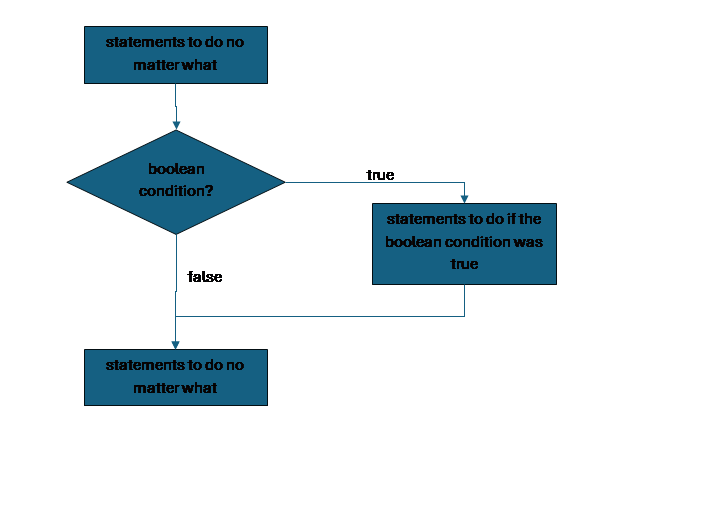
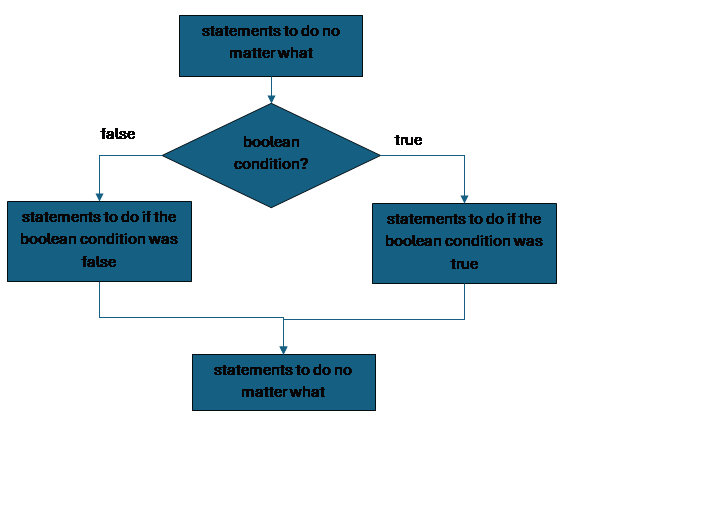
If by itself is appropriate in the case when we have a sequence of steps that we either want to do or skip. In many cases however we have two options, and we want to do one or the other, in that case we would pair the if with an else. The else adds on a second part to the if structure, a space to store the sequence of statements we want to do if the boolean condition is false. If and else always share the same condition, and we would never have else without if.
statements to do no matter what
if (boolean_condition) {
statements to do if the condition is true
} else {
statements to do if the condition is false
}
statements to do no matter what
To visualize this:
Loops
Loops allow us to use a boolean to control how long we keep repeating a sequence of statements. The simplest version of a loop is a while. The keyword while is followed by a boolean in parentheses, and the structure is surrounded with curly braces. In between we put statements that we want to repeat for as long as the condition is true. At the end of these statements, we jump back and re-evaluate the condition to see whether it is still true, and we keep doing this until it is false. Once it is false, we skip the statements inside the while structure and go on with the rest of the program.
statements to do no matter what
while (boolean_condition) {
statements to do as long as the condition is true
(this code needs to eventually change the condition)
}
statements to do no matter what
To picture this:
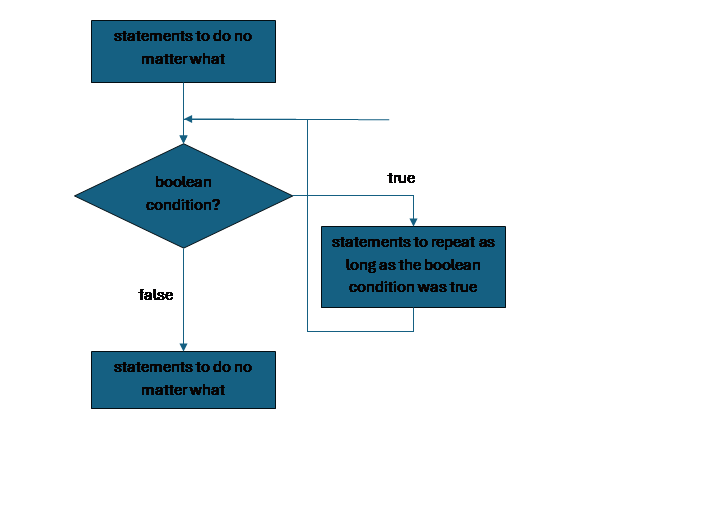
It is important that the code inside the while structure can change the value of the boolean condition and eventually make it false. Otherwise we will be stuck doing the statements inside the loop forever and never continue with the rest of the program. This is called an infinite loop.
If the boolean condition is false the first time we check it, we will simply skip the statements inside the loop entirely and go on with the rest of the program. This is not a problem. However, if the way we wrote the condition means that it is never, under any circumstances, true, then the loop might as well not be in the program, and this problem is called a no loop.
Anything we need to repeat in a program we could achieve with a while loop, but there are other loop structures designed to make it more convenient to write loops for certain common situations. A do-while loop is designed for the case where we must always do the code in the loop at least once, even if we don’t repeat it again after that. A for loop is designed for the very common case where we need to do the code inside the loop a certain number of times.
statements to do no matter what
for (count = 0; count < limit; count = count + 1) {
statements to do while count is less than limit
(this code usually uses count in some way)
}
statements to do no matter what
In general, we would use a while loop (or do-while) if we do not know how many times we need to repeat the loop. For example, if we are trying to get the user’s password, and we don’t know how many tries they will take to get it right, we would use a while. If we do know the number, then we would use a for loop.
Most high level programming languages also provide the keywords break and continue. These allow the program to act in a way that does not respect the loop structure. Break ends the loop early, ignoring the value of the boolean condition that is supposed to control the loop. Continue skips statements inside the loop and jumps back up to re-evaluate the condition immediately. The same results as break could be achieved by making the expression for the boolean condition more complex. The same results as continue could be achieved by adding a conditional inside the loop. Like goto, break and continue in loops generally provide a short-term convenience at the cost of code that is harder to read, debug, maintain, and update.
Methods
A method is a named structure that allows us to store a sequence of steps to do some task, and re-use that structure as needed in our program. Methods can have input that comes from the rest of the program and output that is given back to the rest of the program. This allows us to run the same steps on different data and get the results, without writing the same sequence of steps over and over with different values.
Methods are also called functions, procedures, modules, subroutines, etc, etc. In some languages these have slightly different definitions, but we will simply call all such structures methods.
Each method has a name, and is a structure that contains statements. In another part of the program, we can use the name of the method, followed by parentheses, as a statement. When the program runs, this statement is replaced by the statements that are part of the method structure. This is calling the method.
Methods can have in them any statements and structures we could have elsewhere in the program, creating and assigning variables, using conditionals and loops, and calling other methods. A variable created in a method is called a local variable. Every variable has a scope determining what part of the program that variable is defined in. If we try to use a variable outside its scope, for instance using a variable declared in one method in a different method, that would be an error. Two different methods could each declare a variable in their own scope with the same name, and these would not interfere with each other. Variables defined across the entire program and available in all method are called global variables. In general, global variables are another tool that is powerful but makes programs harder to read and maintain.
Like other code, methods could do input and output, talking to a user or file, but methods can also be given starting input from the part of the program that called them. This is done by the method declaring a list of starting variables, called parameters, inside its parentheses. Any time we want to call the method, we must provide initial values for each of these parameters, called arguments. We say we pass in values as arguments to the method.
Methods can also give a single value, called the return value, back to the part of the program that called it, as output (to the program, not to a user). This is done by giving the method a type and having the method return a value of that type with the keyword return. Returning ends the method and goes back to the part of the program that called the method. The method call in the code evaluates to the return value, so we could assign a variable with a method call on the RHS, and whatever value was returned by the method would be stored in the variable. Alternatively, we could pass the return value on to another part of the program, for instance printing it, or passing it as argument to another method. (This is another case where we want to remember not to lose values: if a method returns, we should do something with that return value!) Methods that do not return anything, for instance methods that just print output to the user but don’t need to give anything back to the rest of the program, have the special type void.
We use a rectangle with extra lines on both sides for method calls in a flowchart.
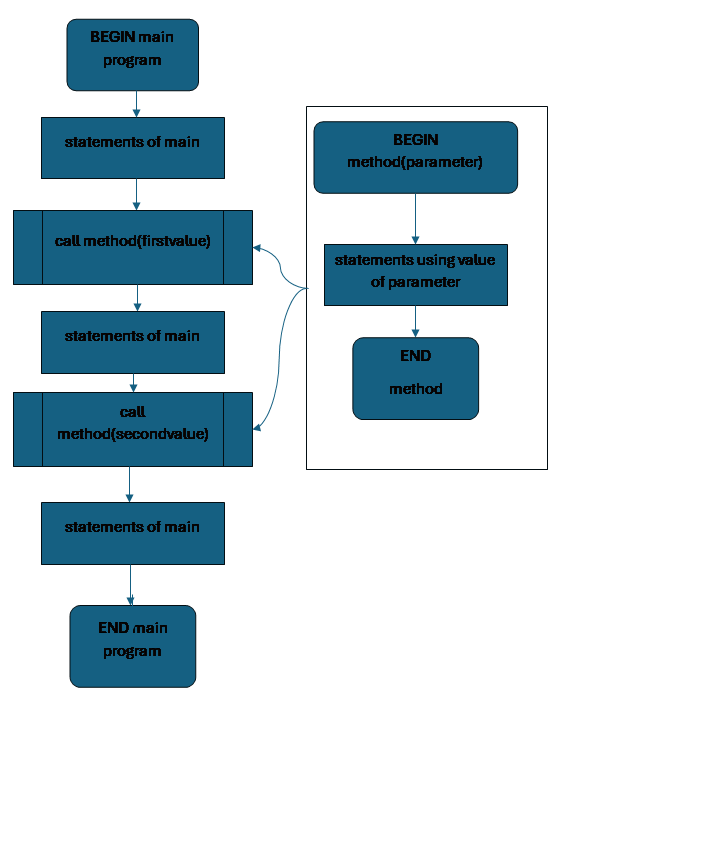
Here is an example of a main program with a (questionably useful) method called calculate, which takes two parameters. The type of the calculate method is int, which means it must return an int value, and we can use a call to calculate anywhere in the main program that we would use any other int. calculate prints the second of its parameters, then calculates a number one larger than the square of the other, and returns that to the program
In the main program, we call calculate several times with different arguments, including literal values, variables, and the results of another call to calculate. Since it returns, each time we call calculate, we make sure to do something with that returned value.
// method with two parameters which returns an int
int calculate (int first, string second){
print("you said " + second)
int temp = first * first + 1
return temp // this is the return value
} // end of calculate
{ // beginning of main program
int a = 3
// call calculate
// this time first is 4
// and second is “four”
// the returned value 17 is stored in b
int b = calculate(4, “four”)
print("b is " + b)
// calculate operates on b and “bee”
// and the return value from that is immediately
// given to calculate again, with “nested”
int c = calculate(calculate(b, "bee"), "nested"))
print("c is " + c);
// the value returned from calculate is printe
// instead of stored
print("last: " + calculate(5 + a, "done")
} // end main program
Nesting
The actions inside a method can include conditionals and loops. The actions that a conditional decides whether or not to do could include another conditional or a loop. The actions inside a loop that we will repeat could include another loop or a conditional. We can have a loop inside a loop inside a conditional inside a loop inside a conditional inside a loop inside a conditional inside a method, and then use a conditional inside a loop inside a conditional to choose whether to call that method. Once we know how to use our fundamental tools, we will be able to put them together in any combination in order to solve problems.
Flowchart Shapes
Depending on the application, there are many shapes used in flowcharts to help visualize complex systems. We may need to be able to visually distinguish files, file systems, cloud shares, mouses, microphones, databases, etc. That level of detail is outside our scope. Here are the most common basic shapes:
• oval for beginning and ending of a program or method
• rectangle for series of statements
• rectangle with side bars for method calls
• diamond for decisions
• parallelogram for input/output or generic data structure
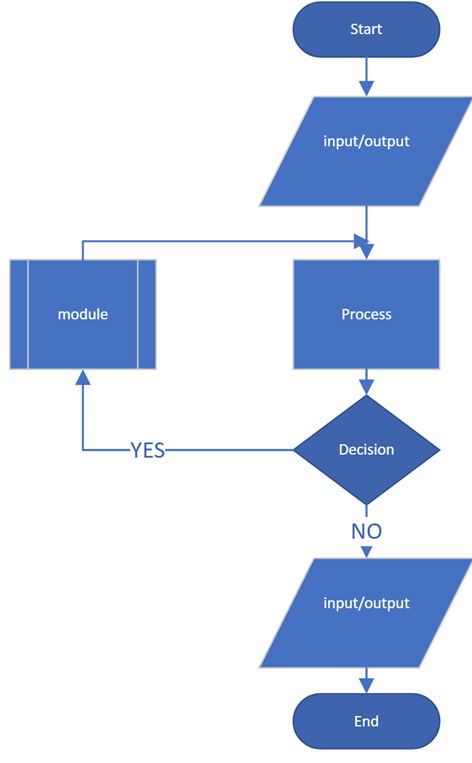
The point of flowcharts is to help in communication and understanding, not a way of writing actual code. Flowcharts are best for representing a process or architecture at a very abstract and general level. We would only include a shape for something in a flowchart if it is important in understanding the process. It is very common, for example, not to explicitly include input/output shapes except if we need to understand an unusual aspect of how input and output have to be handled for a particular program.
Overall Program Structure
Procedural vs Object Oriented structure
Dividing the process of our program into methods and thinking about our programs as a series of steps is a powerful tool for breaking a complex program into manageable pieces. Thinking about a program in this way – as a series of steps, each of which might be a method made of steps – is called procedural programming.
A key part of procedural programming is problem solving by top-down thinking about what the program has to do. We start with a general and difficult problem, and keep breaking it down into smaller and smaller tasks until we find tasks that are easy to do.
For instance, suppose in our program the user sees a map where clicking on any tile reveals either a blank, a number indicating how many monsters are in adjoining tiles, or a monster, and they lose if they click on a monster and win if they reveal every non-monster tile. We could break the program into tasks:
1. set up the map
2. based on user input, repeatedly reveal the tile, until they click a monster or there are no non-monsters left
3. show a message to tell them if they won or lost
We could then break the set up the map task:
1. set up the map
a. set up 10 x 10 tiles
b. choose random locations for 20 monsters
c. for each tile
i. if it doesn't have a monster,
1. calculate how many adjacent monsters it has.
2. based on user input, repeatedly reveal the tile, until they click a monster or there are no non-monsters left
3. show a message to tell them if they won or lost
We could break up the calculation step further:
1. set up the map
a. set up 10 x 10 tiles
b. choose random locations for 20 monsters
c. for each tile,
i. if it doesn't have a monster,
1. calculate how many adjacent monsters it has.
a. check whether we already put a monster in the tile
i. if so stop
ii. if not start a count of adjacent monsters at 0:
1. if the tile to the north has a monster, add 1 to the count
2. if the tile to the northeast has a monster, add 1 to the count
3. if the tile to the east has a monster, add 1 to the count
4. if the tile to the southeast has a monster, add 1 to the count
5. if the tile to the south has a monster, add 1 to the count
6. if the tile to the southwest has a monster, add 1 to the count
7. if the tile to the west has a monster, add 1 to the count
8. if the tile to the northwest has a monster, add 1 to the count
2. based on user input, repeatedly reveal the tile, until they click a monster or there are no non-monsters left.
3. show a message to tell them if they won or lost
This kind of breakdown can give us a good skeleton for our program. We can create methods for each of the steps, starting with a printout for what we want them to do (or no code at all), and fill them in with real code as we go. An empty method like this that needs to be filled in is called a stub.
{ // main program
mapSetup()
gameLoop()
winOrLose()
}
void mapSetup() {
createTiles()
placeMonsters()
countAdjacent()
}
// stub for gameLoop
void gameLoop() {
print("The game loops until the user clicks a monster or wins")
}
// rest of stubs…
However, we are limited in what we can write in such a skeleton until we have made some decisions about how we are going to write the details in those stubs. So, paired with top-down design is the idea of bottom-up implementation. That is, once we think we've broken everything down enough, get each of the tiniest subtasks coded up and tested, and build up the overall program from there, instead of trying to write the main part of the code first.
For modern programs, even a very complex series of steps might not reflect the way we really think about what is happening. When a user creates a document in a word processor, for example, they might use any of hundreds of formatting tools, in any order, all of which interact. Object orientation is a design approach that structures a program in terms of interacting components of a situation, each of which can include both data and actions.
Because procedural design focuses on the flow of control through the program first, and tends to fill in data structures later, people from a procedural background sometimes say that object orientation is "bottom-up" because it focuses on data structures first. But equally, people from an object oriented design background that focuses on the abstract data structures first, and fills in the details of actions later might say that they are doing top-down, and procedural looks bottom-up to them.
But if we think of top-down as referring to large-scale, abstract decisions about how the program works, and bottom-up as referring to small-scale details of how we do the implementation, both approaches tend to use top-down design and encourage bottom-up implementation. A better way to view the difference is that the procedural approach is process first, data structures later, while the object oriented approach is data structures first, process later.
In practice, both approaches need to consider both the steps of the overall program and the data structures involved throughout: we can't get very far planning the steps in our tile game program until we've decided how we're going to store the information about the tiles, and any object oriented program still involves a lot of procedural programming for the actions that happen along the way.
In this course we will mostly be working with procedural programming to handle simple tasks, so that we understand the basic skills and tools involved. We will revisit object orientation at the end of the semester.
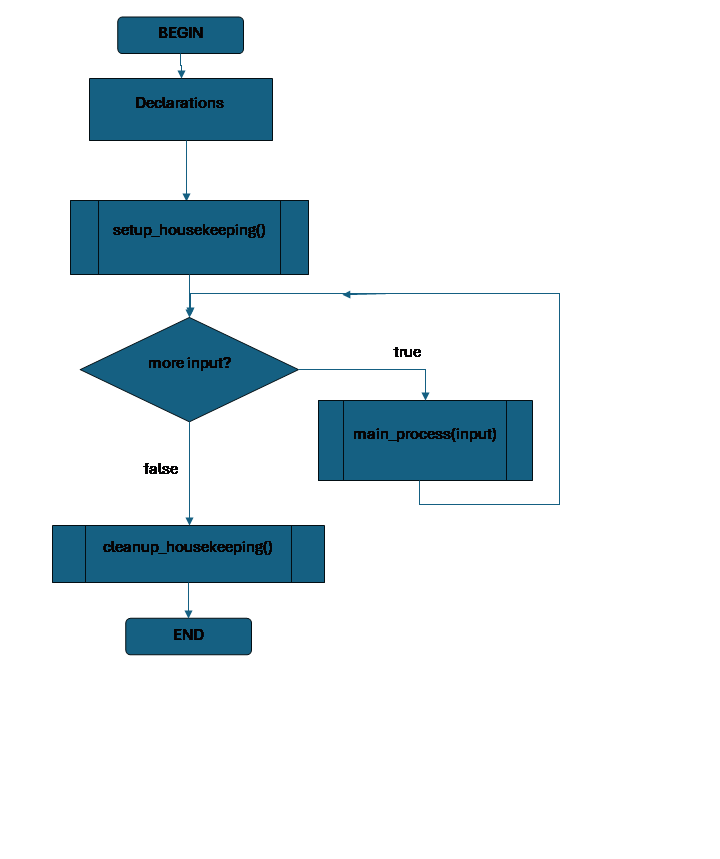
A Main Loop Program
There is a very common overall shape for programs when we are working procedurally:
Declare data structures for the program.
Do any other setup required before we start the main activity this program does.
while (there is still input) {
Do whatever is the main process for this program, acting on that input.
}
Do any cleanup so that the program can end correctly.
First, we set up our data structures, declaring and initializing the main variables we need to do the program’s task. Then we may need to do some extra tasks once, to prepare for what we need to do in the rest of the the program; for instance, we might need to open a file, or do some initial calculations. Then the program gets to work: the program processes data in a loop that repeats as long as there is still data left to go; this data might be a list of values in a file, or the input we are getting from a user until they choose to quit the program. Once there is no more data to process, there may be some extra tasks we need to do to clean up, for instance saving values and closing the file, or doing a last calculation that puts all the data together into a final result.
Setting up before and cleaning up after the main actions of the program are often called “housekeeping.”
When we imagine a program with this form, a way to keep the design clear and easy to deal with is to put the setup housekeeping, the main process, and the cleanup housekeeping each in a method of their own.
The main process is likely to be the most complex part of the code, but setup, cleanup, and the main process all are likely to actually be broken down into multiple methods to achieve subtasks. It would be very common for each of those methods to also have this same setup-main-cleanup structure!
This idea of the shape of a program is so general that we can use it to picture almost anything a real program will do. For right now, it is a useful tool for thinking through simple programs. It is so general, though, that once you are used to programming you may find that it stops being particularly useful.
 Declaring all
the main data structures at the start of the program like this is one
reasonable approach to readable design.
The idea is that if a programmer needs to check the type or initial
value of a variable, they just need to scroll back to the declarations at the
top and they will find it.
Declaring all
the main data structures at the start of the program like this is one
reasonable approach to readable design.
The idea is that if a programmer needs to check the type or initial
value of a variable, they just need to scroll back to the declarations at the
top and they will find it.
However, this can end up causing a lot of frustrating scrolling, and also creates a situation where we might not notice that a variable was changed during long run of code between all the declarations and when it finally becomes important. So an equally reasonable approach is not to create a variable until right before it is actually needed.
Also, if we do take the "all variables declared first" approach, and we have many temporary variables used during a task, it may impair readability for those to be included with the list of the most important data needed for the overall task at the top.
Often, a hybrid approach is the right answer: the fundamental data structures that are needed to understand the overall program – or to understand the current subtask, for a method – could be declared at the top, but other data structures are declared just before they are first used instead.
Readability
We know that we have comments, notes we can include in a program to help a reader understand what the program does. Comments are great for readability, especially as you are learning to program.
You can copy a description of what the program overall, or a certain segment, is supposed to do, make it a comment, and have it visible right inside the code as you are thinking about how to implement that requirement. You can keep track in comments of your progress when you stop working on a problem for a while and need to return to it later. You can leave yourself notes in your own words about why you wrote part of a code in a certain way, to help you figure out how to do similar things in future.
Part of learning to program, however, is learning to write code that is self-documenting, by which we mean: code that doesn’t need many comments because the way it is written clearly communicates how it works to an informed programmer.
Thinking about the overall shape of a program is one important element of creating a program that is easy to read, and thus easy to work with – that is, to debug and to update.
Procedurally breaking a complex task down into many methods is one of our most powerful tools when thinking through a program that does a complex process. We need to think carefully about what each method does, what parameters in needs for input and what value it might return for output. By breaking a big task into many small tasks, each handled by a separate method, we simplify our initial problem-solving task. We also make it much easier to write the code and test it, because we can treat each sub-task separately instead of taking on the mental load of keeping the whole program process in mind while trying to implement or test an individual part.
Naming variables and methods is important for readable code. A name should tell at a glance what part a variable or method plays in a program. Too short and it won’t tell anything, but too long and it will require thought to read and understand.
We also need to think about how we write expressions, so that calculations are easy to understand. Spacing and extra parentheses can make it easier to read a complex expression without changing the result. In some cases it is worth doing a calculation across several statements and using extra, temporary variables. Some people find doing a lot of work in a single complex expression very satisfying… until they are faced with debugging an “elegantly brief” complex single expression in somebody else’s code that gives slightly incorrect results off for no obvious reason.
Your code should also help the user understand what is happening and help them cooperate with your program. Users who understand what you need are less likely to give you well-meaning input that actually breaks your program! One major reason for the popularity of Graphical User Interfaces isn’t just because users find them easier, it is because they give us tools that limit what values a user can enter. A user can’t mess up our programs by entering “three” or “7.99” for their age if instead of having them type in a value we simply given them a slider that can only be moved to valid values.
Lacking fancier user interface tools, we can help the user by printing a prompt before reading in values, telling them what data we want, and in what format, as well as including meaningful descriptive text when we print results.